
Scheduled Reports for
Formidable Forms
Export and automatically deliver reports from Formidable Forms
Generate, export and email organised reports from your Formidable Forms entries, manually or on a schedule.
- Built for WordPress
- Works with Formidable Forms
- Scheduled reporting and CSV exports
Free WordPress plugin · No account required
Independent WordPress plugin developed and supported by SPA Web Design.
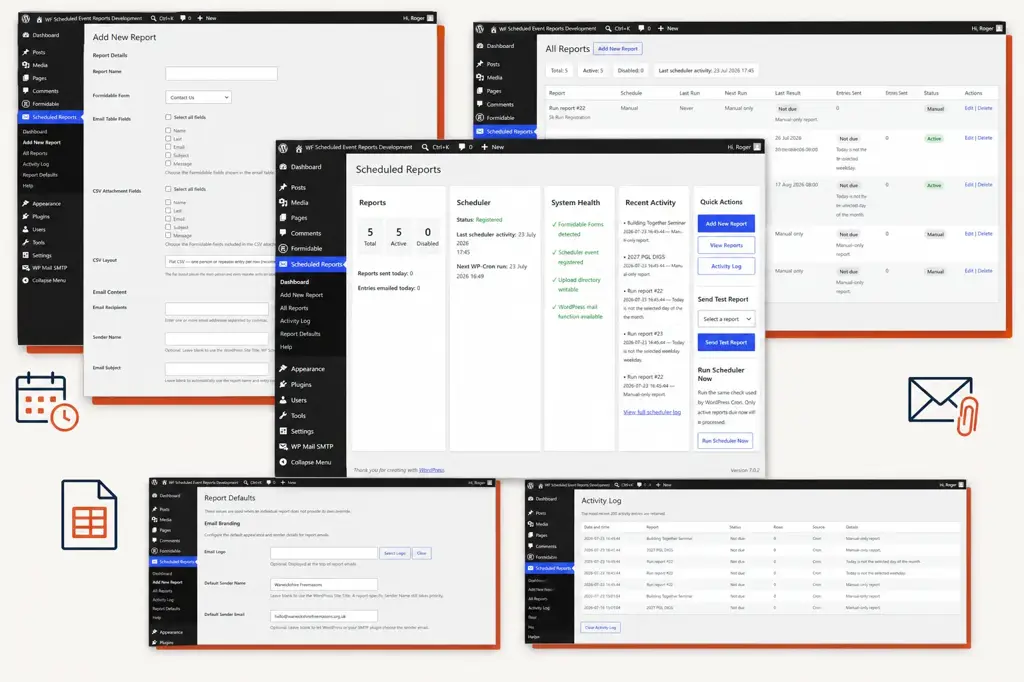
Turn Formidable entries into organised reports and exports
Manually checking form entries, selecting the relevant information, exporting the data and sending it to colleagues or clients takes time. Scheduled Reports for Formidable Forms brings these steps together, allowing you to generate, export and deliver organised reports directly from WordPress.
01
Choose your form and fields
Select any Formidable Form and choose which fields to include in the email report and optional CSV export.
02
Set the report and schedule
Choose whether to include all entries, new entries or entries changed since the previous successful report. Run it manually or schedule it daily, weekly or monthly.
03
Export and deliver automatically
Send a branded HTML report automatically to one or more recipients, with an optional CSV export containing your selected entry data.
Everything you need to schedule, report and export
Create reports and exports containing the information you need, control when they are generated and deliver them automatically to the right people.
Select fields for reports and exports
Choose which fields from your Formidable Form appear in the email report and optional CSV export.
Control which entries are included
Export all entries, new entries, or entries created or updated since the previous successful report.
Flexible scheduling
Run reports and exports manually or schedule them to be generated daily, weekly or monthly.
Professional email reports
Send clearly organised HTML reports to one or more selected recipients.
CSV data exports
Attach selected Formidable entry data as a CSV file for analysis, sharing or record keeping.
Monitor report and export activity
View report status, scheduled runs and recent delivery activity from within the WordPress dashboard.
See how reporting and exporting works
Explore the WordPress interface used to create reports, configure CSV exports, manage schedules and monitor delivery activity.
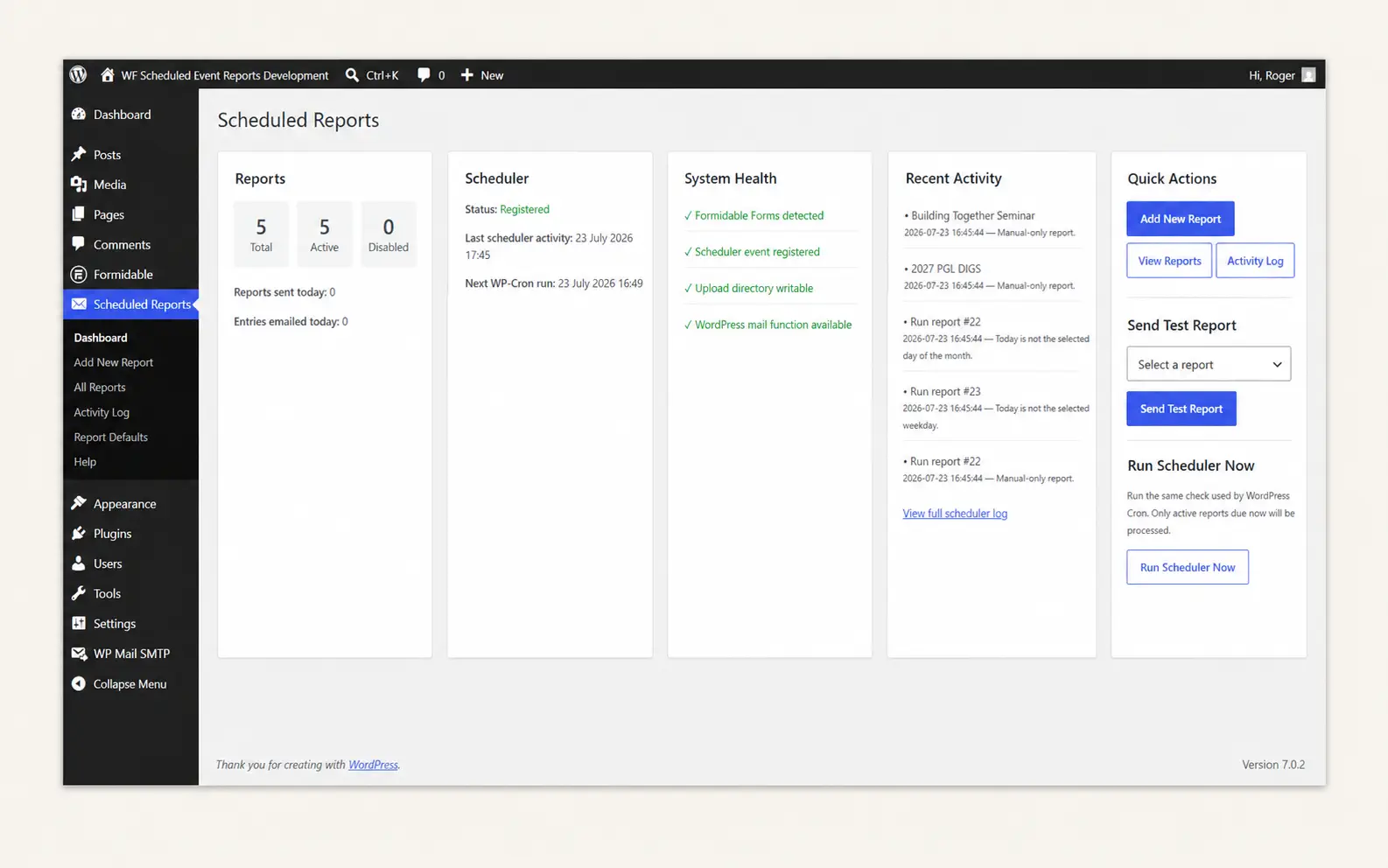
Reporting and export dashboard
View active reports and exports, scheduler status, system health, recent activity and quick actions.
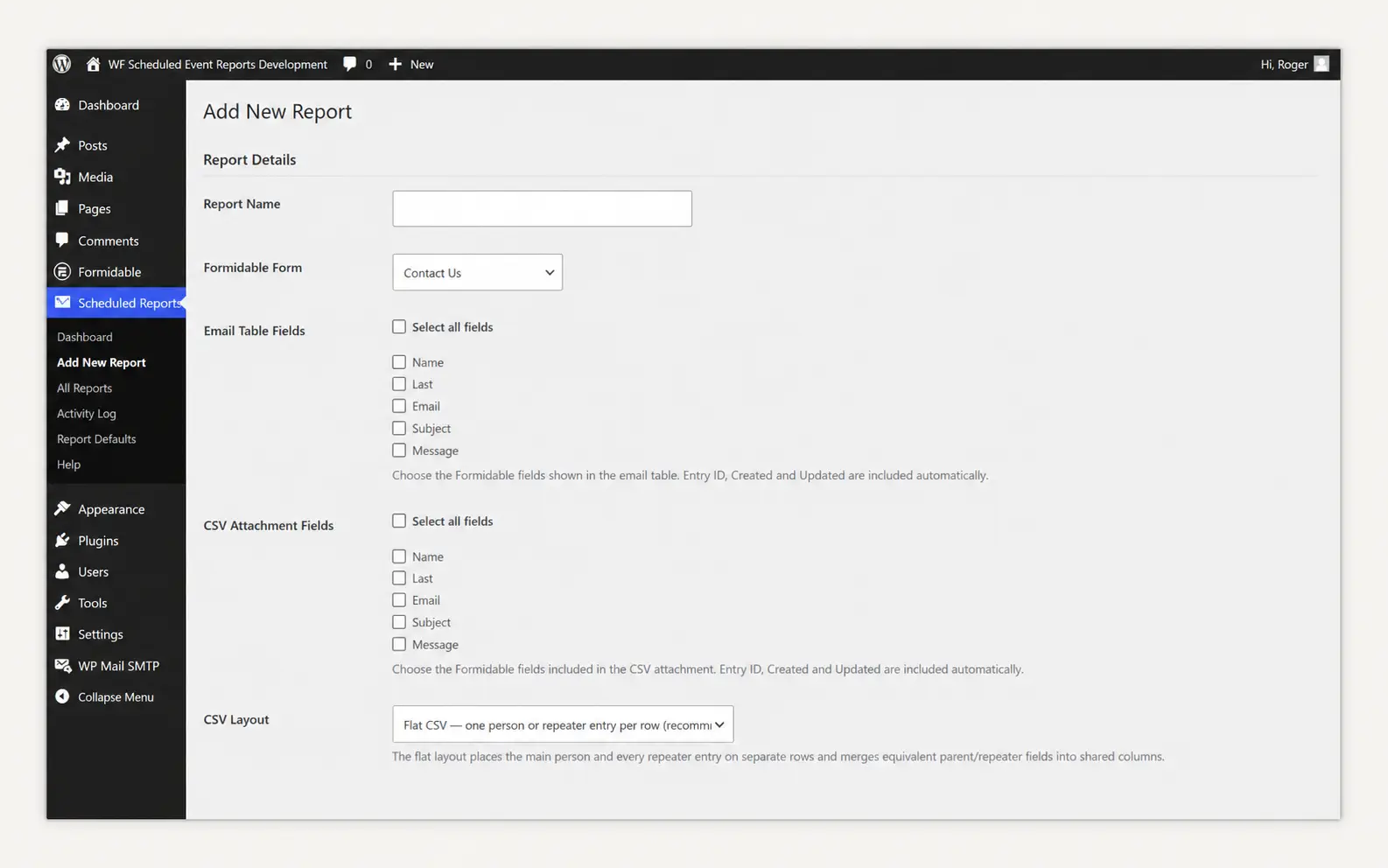
Create a report or export
Choose a Formidable Form, select the fields for the email report and CSV export, add recipients and configure its schedule.

Manage reports and exports
Review each report’s schedule, previous and next run, delivery result, entries included and current status.
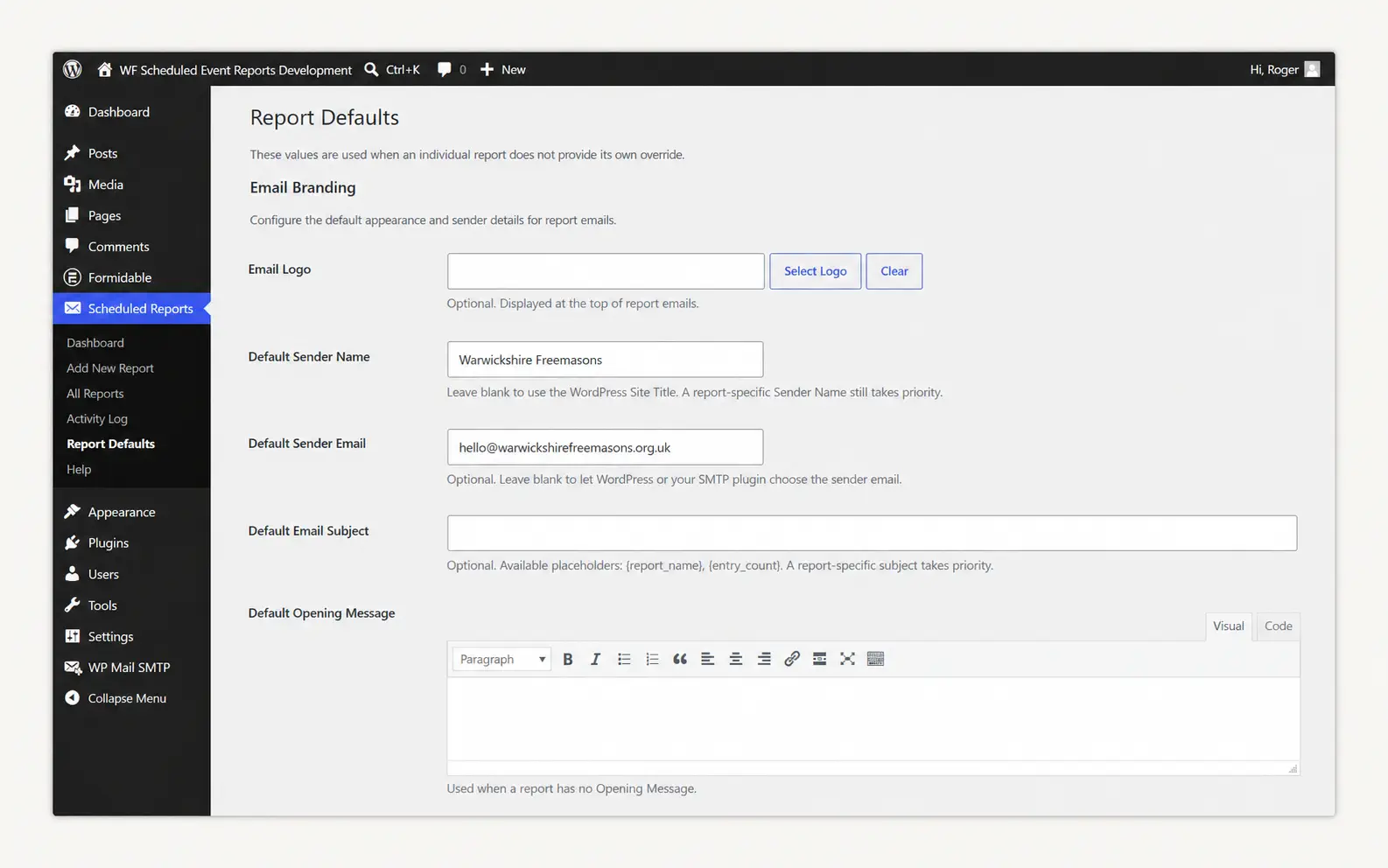
Configure report defaults
Set default email branding, sender details, subject lines and introductory or closing messages to maintain consistency across your reports.
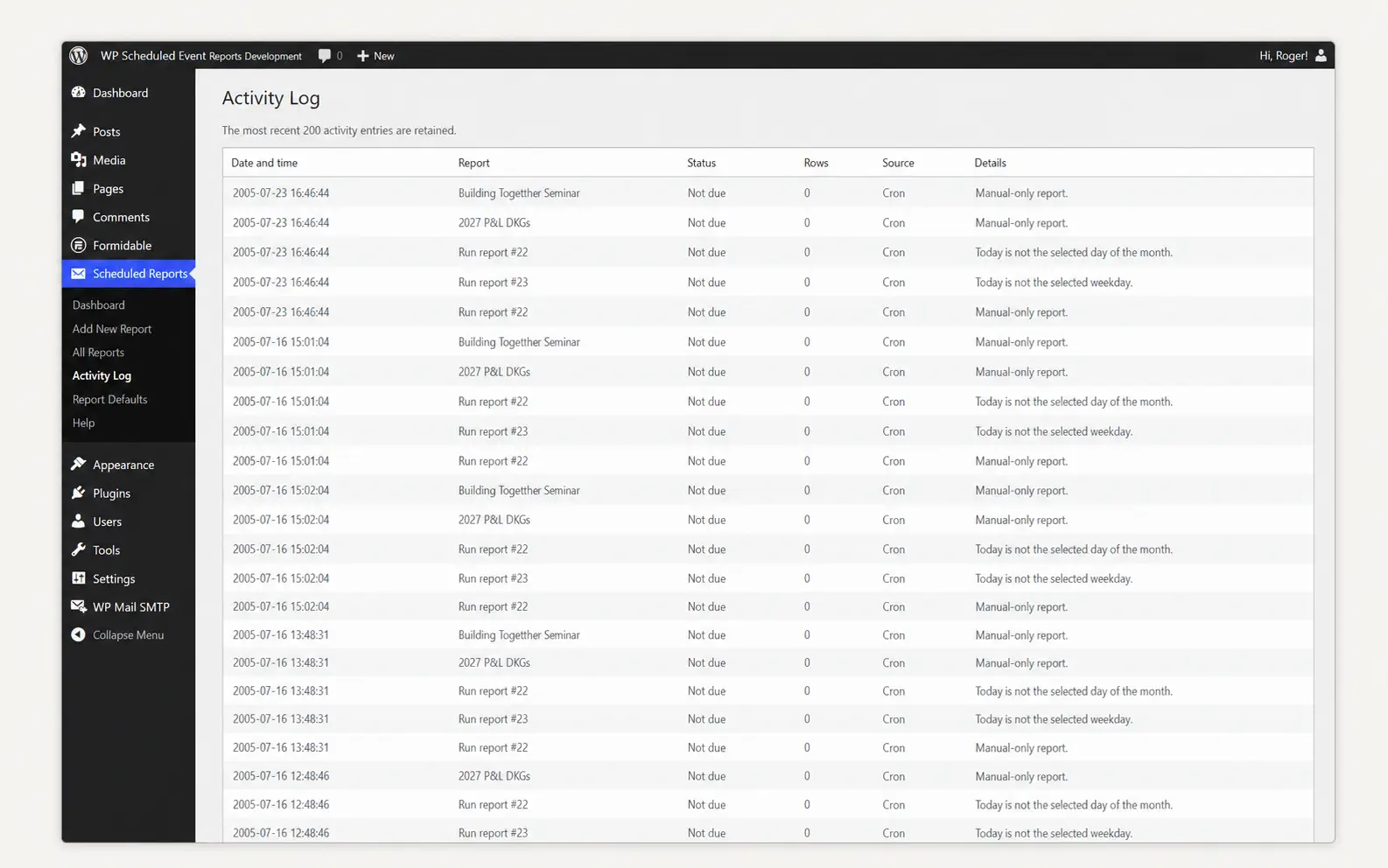
Monitor report and export activity
Check when reports and exports were processed, whether they were sent or skipped, and how many entries were included.
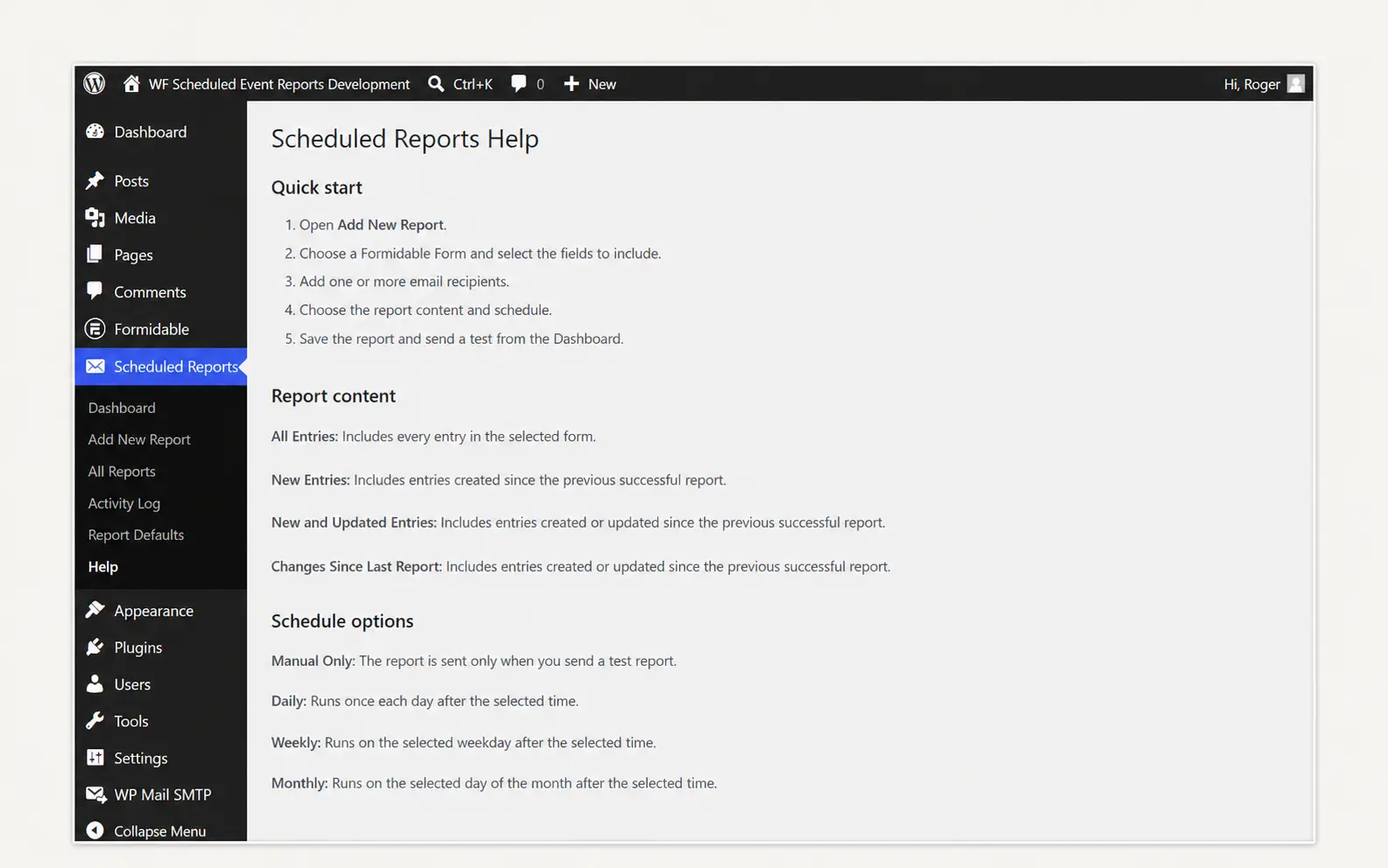
Built-in help and guidance
Access clear instructions covering report creation, entry selection, export options, scheduling and troubleshooting directly within WordPress.
Start reporting and exporting for free
The free version includes the plugin’s core reporting and CSV export features for one report.
- Create and manage one scheduled report
- Use any Formidable Form
- Select the fields included in the email
- Select fields for the optional CSV export
- Include all, new or recently changed entries
- Run reports manually, daily, weekly or monthly
- Send reports to one or more recipients
- Customise the sender, subject and email messages
- Add an optional logo and email footer
- Monitor scheduled runs and report activity
Free WordPress plugin · No account required
What you need to use the plugin
Scheduled Reports for Formidable Forms works entirely within your WordPress website and uses your existing Formidable Forms entries.
Requirements
- A WordPress website
- Formidable Forms installed and active
- WordPress email delivery configured
- WP-Cron or a server cron available for scheduled reports
- Using an SMTP service is recommended to improve the reliability of report email delivery.
Important to know
- No separate account is required
- Reports are managed within WordPress
- HTML reports are delivered by email
- Selected entry data can be attached as a CSV export
- The free version allows one report
- Reports can be sent to one or more recipients
Questions about Scheduled Reports for Formidable Forms
Find out how the plugin works, what the free version includes and what you need to start creating scheduled reports and CSV exports.
What does Scheduled Reports for Formidable Forms do?
The plugin turns entries from your Formidable Forms into organised HTML email reports and optional CSV exports. Reports can be generated manually or delivered automatically on a daily, weekly or monthly schedule.
Can I use it with any Formidable Form?
Yes. Select any form created with Formidable Forms and choose the individual fields you want to include in the email report and optional CSV export.
Do the email report and CSV export have to contain the same fields?
No. You can select one set of fields for the HTML email report and a different set for the CSV attachment. This allows you to tailor the emailed summary and exported data separately.
Which form entries can be included?
You can include all entries, new entries, or entries created or updated since the previous successful report. This helps prevent the same information being repeatedly reported unnecessarily
How often can reports be delivered?
Reports can be run manually or scheduled daily, weekly or monthly. Depending on the schedule selected, you can choose the delivery day and time.
Can I send a report to more than one recipient?
Yes. Each report can be sent to one or more email addresses, making it suitable for sharing information with colleagues, clients, administrators or other selected recipients.
What is included in the free version?
The free version allows you to create and manage one report, including scheduled HTML email delivery and an optional CSV export. There is no account to create and no payment information is required.
Do I need to configure SMTP?
The plugin uses your WordPress website’s existing email system. SMTP is not compulsory, but it is strongly recommended because it generally provides more reliable email delivery.
Will scheduled reports run if nobody visits my website?
WordPress normally uses WP-Cron to process scheduled tasks. Because WP-Cron is triggered by website visits, reports may be delayed on sites with very low or no traffic. For dependable, timely delivery, your hosting provider can configure a server cron to run WordPress scheduled tasks regularly.
Is my form data sent to an external reporting service?
No separate reporting account or external reporting platform is required. Reports are generated within your WordPress website and delivered using its configured email service.
Can I create more than one report?
The free version allows you to create and manage one report. If you need separate reports for different forms, recipients, schedules or purposes, the planned Pro version will allow you to create unlimited reports.
What will the Pro version include?
The planned Pro version will include everything available in the free plugin, together with additional features for organisations that need more advanced reporting and exporting.
Planned Pro features include:
- Unlimited reports
- PDF report exports
- Microsoft Excel/XLSX exports
- Continued plugin updates
- Priority support
Additional Pro features may be introduced as development continues. Full details and pricing will be published before the Pro version is released.
Need help with Scheduled Reports?
If you need help installing or configuring the plugin, or believe you have found a problem, complete the support form and I’ll take a look.
Support covers the Scheduled Reports plugin itself. Questions relating to Formidable Forms, your website hosting or other WordPress plugins should be directed to the relevant provider or developer. Bespoke customisation is not included within standard plugin support.
- Installation and configuration help
- Reporting and CSV export questions
- Bug and compatibility reports
- Direct support from the plugin developer
- For your security, never include passwords, administrator login details or other sensitive information in this form.
Contact plugin support
Provide as much information as possible so I can understand and investigate the issue.
FREE WORDPRESS PLUGIN
Ready to automate your Formidable Forms reporting?
Create, schedule and deliver organised email reports with optional CSV exports directly from your WordPress website.
One report · Scheduled email delivery · Optional CSV exports · No account required